Engagement details
The Engagement tab is always present once a log is imported. It groups four views of audience loyalty and session shape into sub-tabs, each answering a different question about how your chat behaved during the stream.
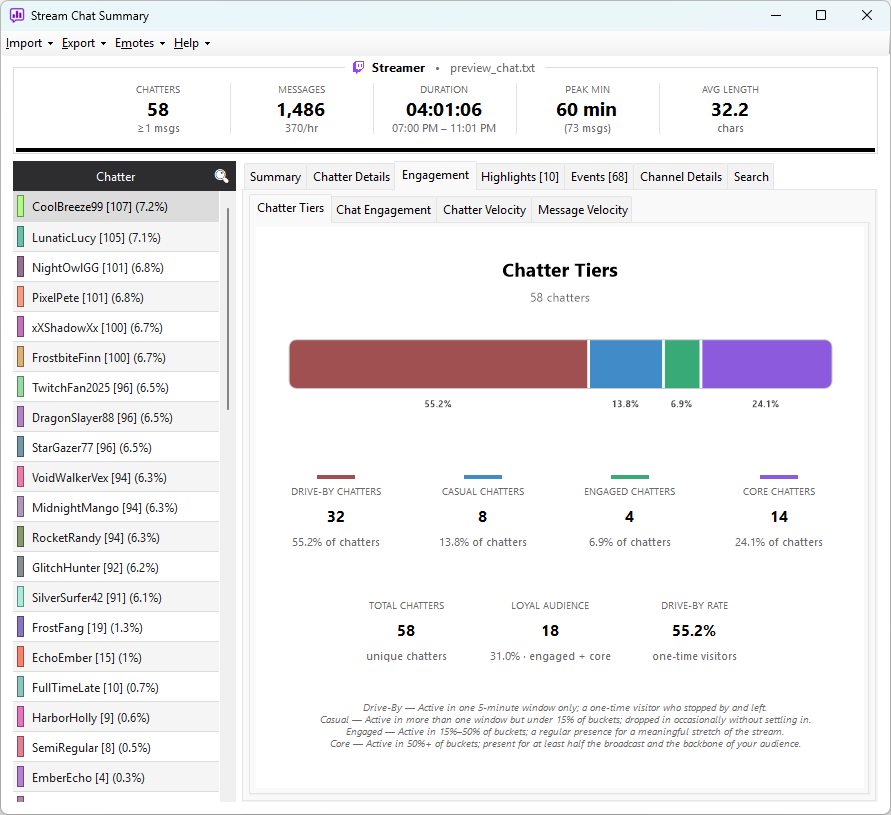
Sub-tabs at a glance
Chatter Tiers
Who was there just once versus who came back throughout the stream. Chatters are classified into four participation tiers — Drive-by, Casual, Engaged, and Core — based on how many distinct 5-minute windows they appeared in.
The sub-tab shows a stacked bar chart of the tier split, per-tier counts with percentage sub-labels, and a three-tile strip: total unique chatters, loyal audience count (Engaged + Core combined), and drive-by rate.
Chat Engagement
How intensely the audience was chatting at each moment. A dual-series chart plots messages per minute against unique chatters per minute across 5-minute buckets, with a composite engagement score (0–100) overlaid on the right axis.
Below the chart, a six-tile strip shows average and peak unique chatters per 5-minute bucket, peak messages per bucket, average messages per chatter, and average and peak engagement score.
Chatter Velocity
The shape of attendance over the stream — when viewers arrived and when they started leaving. Three series track present chatters per bucket (the size of the room at any moment), cumulative arrivals, and cumulative departures.
Below the chart, a per-bucket grid shows active, arrived, departed, and net counts for each 5-minute window, with a stacked tier-breakdown bar for each.
Message Velocity
The simplest view of chat activity: a filled-area line chart of total messages per 5-minute bucket across the whole stream. Spikes line up with hype moments — raids, sub bombs, notable plays. Below the chart, a grid lists every bucket with its message count and a proportional bar; the peak bucket is highlighted in both.
Next: Event details →