Event details
A chat event is anything happening in the channel that isn't a plain message — a subscription, a raid, a moderator action, a channel point redemption, a pinned announcement, a Super Chat. Stream Chat Summary captures these from Twitch, Kick, and YouTube during live monitoring, surfaces them in a dedicated Events tab, and preserves them through export and re-import.
This page lists every kind of event the app recognises and where each one comes from.
Where events show up
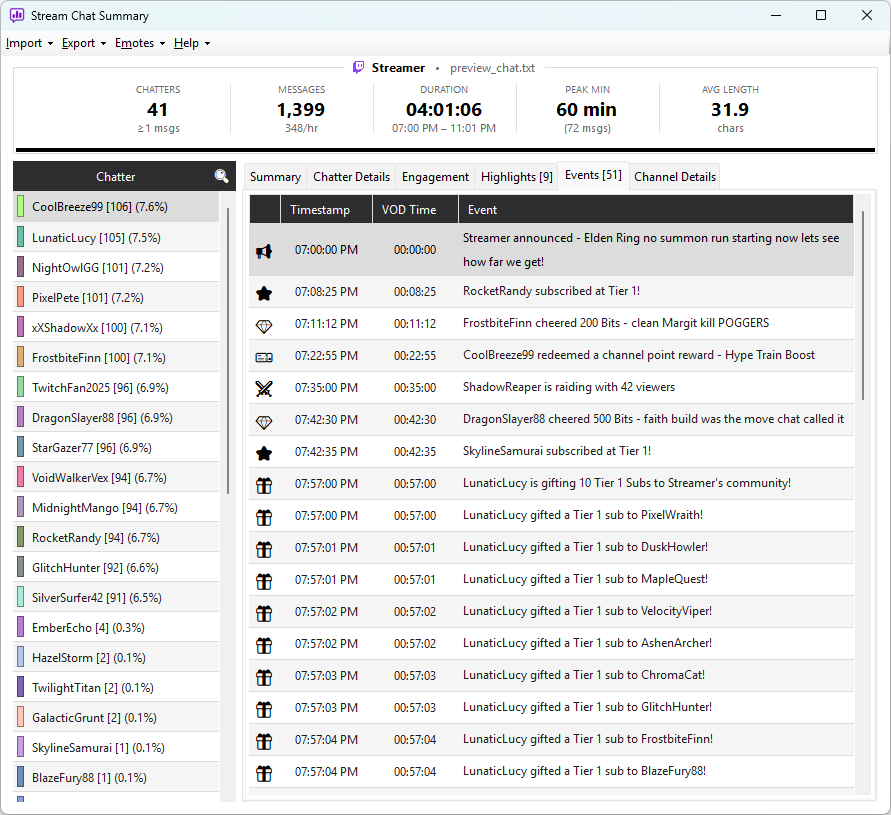
The Events tab appears on the right side of the main window whenever the loaded log contains at least one event. It's hidden if there are none — a VOD import or a quiet live session may have no events at all.
Each row shows the time, an emoji indicating the event type, the user who triggered it, and a human-readable description.
Where events come from
Events take three different paths into the app depending on the source:
The three live capture paths (Twitch, Kick, and YouTube) are the only ways to record
events in real time. VOD and CSV imports never contain events — the
source data doesn't carry them. Saved log files (Chatterino-format .log
or .txt) can contain events if they were originally exported from this
app or any tool that uses the same format.
Twitch events
Twitch live monitoring captures the full range of subscription, raid, moderation, and reward events:
| Event | Triggered by |
|---|---|
| New subscription | First-time subscription to the channel |
| Resub | Renewal of an existing subscription (includes streak / cumulative months) |
| Gift sub | One viewer gifts a sub to another, named viewer |
| Mass gift | Bulk gift (5, 10, 50 subs to random viewers) |
| Anonymous gift sub | A gifted sub from an anonymous gifter |
| Gift upgrade | Someone upgrades a previously gifted sub |
| Anonymous gift upgrade | The same, but the original gifter was anonymous |
| Prime upgrade | Prime sub upgraded to a paid tier |
| Community pay forward | "Pay it forward" gifted sub chain |
| Raid | Another channel raids in, bringing viewers |
| Unraid | A raid is cancelled by the raider |
| Announcement | Mod or streamer posts a highlighted announcement |
| Bits | Cheer (bit donation) attached to a message |
| Bits badge tier | User unlocks a new bits badge tier |
| Channel point redeem | Channel point redemption attached to a message |
| Reward gift | Bits leaderboard reward triggered for chat |
| First-chatter ritual | New-to-chat / first-time-chatter ritual |
| Shoutout received | /shoutout directed at the streamer from another channel |
| Watch streak | Multi-stream consecutive view milestone |
| Modiversary | Moderator anniversary milestone (e.g. 6 months as a mod) |
| Shared chat notice | Cross-channel event the app couldn't classify further |
| Clear chat | Mod clears the entire chat |
| Timeout | User is timed out by a mod (includes duration) |
| Ban | User is banned by a mod |
| Unban | User is unbanned |
| Notice | Channel-level notice (slow mode toggled, follower-only mode, etc.) |
Twitch occasionally adds new subscription or reward variants. If live monitoring sees one the app doesn't yet recognise, it's recorded for diagnostic purposes but not shown in the Events tab — support catches up in subsequent app updates.
Kick events
Kick supports a smaller set of event types. The app maps each one to the same category as its Twitch equivalent, so behaviour and exports stay consistent across platforms:
| Event | Triggered by |
|---|---|
| New subscription | First-month subscription to the channel |
| Resub | Renewal of an existing subscription |
| Gift sub | One viewer gifts a sub to another (each recipient becomes one event) |
| Kicks gift | Viewer sends one of Kick's named virtual-currency gifts (e.g. "Hell Yeah"). Mapped to the Bits category so it shows alongside Twitch cheers in stats and the Thanked column |
| Host | Another channel hosts the stream (Kick's equivalent of a Twitch raid) |
| Announcement | Pinned message posted by a mod or streamer |
| Ban | User is banned by a mod |
| Timeout | User is timed out by a mod (includes duration) |
| Unban | User is unbanned |
| Notice | Generic channel notice |
Kick's virtual-currency gifts (Kicks) are surfaced as Bits events, which is the closest Twitch analogue. Kick support is still new and some channel-event types may not yet be recognised — if you spot one that isn't captured, please report it as a bug via Help → About inside the app.
YouTube events
YouTube live chat exposes monetary and membership events through the Data API. Each is mapped to the nearest existing category so it shows alongside its Twitch and Kick equivalents in stats and the Thanked column:
| Event | Triggered by |
|---|---|
| Super Chat | A paid, highlighted message; the amount is included in the event text |
| Super Sticker | A paid animated sticker; the amount is included in the event text |
| New member | A viewer joins a channel membership (mapped to New subscription) |
| Membership milestone | A member marks a months-as-member milestone (mapped to Resub) |
| Gifted memberships | A viewer gifts a batch of memberships (mapped to Mass gift) |
| Gift membership received | An individual viewer receives one gifted membership (mapped to Gift sub) |
Both are their own event types and carry the amount string, so paid interactions appear in the Events tab and the Thanked column just like Twitch bits.
Events in saved log files
When you export to a .log file, events are written with their type
preserved so they can be re-imported without losing any detail:
[14:32:24] [raid] Raid from another_channel with 47 viewers
[14:35:12] [sub] new_user subscribed at Tier 1
[14:41:05] [timeout] viewer123 timed out for 600 seconds
The bracketed tag identifies the event type. On re-import, the app recognises these tags and restores the original event category. Lines without a known tag are imported as generic events.
You can also hand-write a .log file using [time] [type] body lines
and the importer will pick up the typed events — useful for testing
or annotating an existing log after the fact.
CSV imports never have events
The CSV format (TC Downloader and similar) only carries messages — there's no column for event data. CSV imports produce a chat log with zero events, and the Events tab stays hidden.
Per-source summary
| Source | Live events | Saved events | Coverage |
|---|---|---|---|---|
| Twitch live monitor | Yes | — | All Twitch event types |
| Kick live monitor | Yes | — | Subs, gifts, Kicks gifts, hosts, mod actions, announcements |
| YouTube live monitor | Yes | — | Super Chats, Super Stickers, memberships (new, milestone, gifted) |
| Saved .log import | — | Yes (if exported with tags) | Whichever were captured originally |
| CSV import | — | — | None |
| Twitch VOD import | — | — | None |
Live monitor sessions automatically save to disk in .log format with
tagged events, so a captured live session can be re-analysed later and
the Events tab will populate exactly as it did during capture.